Yanhua ACDP2 BMW BDC2 BDC3 BCP IMMO Package Add Key All Keys Lost
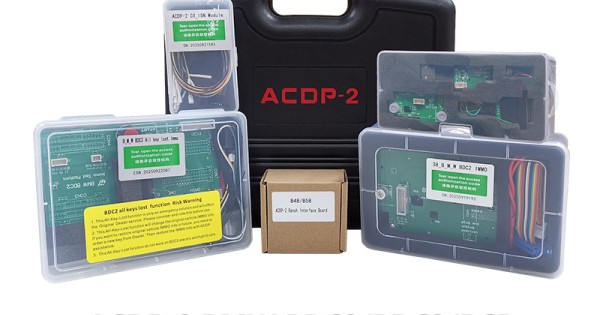
Yanhua ACDP-2 BMW BDC2/BDC3/BCP IMMO Package with licensesIncludes ACDP-2 master, ACDP Module 3/38, AKL Platform, BDC3 BCP Interace Board and ACDP-2 B48/B58 Interface BoardSupport BMW BDC2 add keys, all key lost, mileage reset, module refresh and Copy data replacementSupport BMW BDC3 BCP Display key copyingYanhua Mini ACDP2 Module 38 BMW BDC2 Bench Test Platform Module 3 B48 Interface Board BDC3 BCP AdapterYanhua ACDP2 BMW BDC2/BDC3 Package: focused BMW IMMO solutionBest for: BMW BDC2, BDC3 and BCP add key, all keys lost, mileage reset and module replacement workflows.Why choose it: a focused Yanhua package for BMW work instead of a general diagnostic tablet.Good comparison: compare with Autel IM508S/IM608 packages when broader IMMO coverage is needed.VW MQB packageAutel IM508SAutel IM608 IIView 2026 Hot Selling OBD ToolsThe package contains:Yanhua ACDP2 host hardwareModule 38 with license with license A503Module 3 ISN module with licenseBMW BDC2 bench test platform with license A504BMW B48/B58 interface board Get a free BMW BDC3 BCP interface boardFunctions:Supports BMW BDC2 add keys and all keys lost.Supports BMW BDC3 keys copy.Supports BMW BCP keys copy.Supports BMW B48/B58 DME ISN read.Supports BMW BDC2 module refresh and Copy data replacement.!Important Notice1. Above items are must-to-have tools for BMW G-Chassis BDC2 all key lost programming. For ACDP old user, you just need buy the one which you do not have, for new user, need buy all of them.2. If you have other device which can read and write BMW DME ISN, you do not need the ACDP Module 3 B48 Interface Board)3. This package is for BMW BDC2, BDC3, BCP key programming. If you want to do BMW BDC2 mileage correction, need buy YH35XX programmer Simulator extra4. Flexible to add other ACDP modules.5. If you need BMW G blank keys, please contact us to purchase. ACDP-2 Basic Module Features:Yanhua Mini ACDP-2 supports 93/24/25/35/95 Series EEPROM in circuitprogramming(ICP) and on adapter board programming(OBP). This module is a necessary basic configuration for other modules.Extended Functions: By expanding more adapters to achieve various functionsauch as ECU programming key programming/matching, ECU refresh. The current adapters include: BMW CAS, BMW FEM/BDC, BMW DME, Meter/Instrument, BMW Key refresh, BMW FRM(Footwell), BMW EGS(Gearbox), Fujitsu CPU, VW MQB, Jaguar Land/Rover KVM, Porsche BCM, Volvo, etc. Mini ACDP-2 Advantages: 1. No need removing chip, No need soldering, No need cutting line, No needlifting the pin. 2. USB direct connection, plug and play. wifi connection, wireless free. 3. Pin intelligent detection, Data reading and writing is safe and reliable. ACDP BMW BDC2 IMMO Module 38 Function:Supports adding key for all versions of BMW BDC2.Enable keys, disable keys, reset starter motor, headlight height matchBMW BDC2 all key lostBMW BDC2 Mileage CorrectionBMW BDC2 Module RefreshBMW BDC2 Module Copy ReplacementSupports original key and aftermarket key. Both 315Mhz (US) and 433MHz (EU).Just need to insert the interface board to the BDC2 module directly.No annual fees or per-use charges—one-time solution with zero hidden costs. BMW BDC2 Key Learning Test Platform: All‑Key‑Lost License Update: Includes free software license updates for BMW BDC2 key learning (Module 38). Module‑Free Bench Learning: Program new keys on the bench without reinstalling the BDC2 module in the vehicle. Emergency Function Testing: Enables ignition-on and emergency start testing to verify successful key learning. Remote & Keyless Testing: Supports connection to smart antennas, IR boxes, and keyless systems for remote-only validation. Cluster & DME Integration: Expandable to test integration with instrument cluster and engine control units (DME). Plug‑and‑Play Interface Board: Dedicated board replaces cable harnesses—efficient, safe, and straightforward. Fully Compatible: Works with any ACDP-enabled device that supports Module 38. ACDP BMW ISN Module 3: Support Reading/writing BMW DME ISN(Necessary when all-key-lost). 1. Support OBD/CAN reading BMWE chassis MSV80/MSV801, MSD80/MSD802, MSD81/MSD812, MSD851/MSD852, N62_TUE/N62_TUE2, MEV9N46/MEV9N46L, N46(MV1746), MSV70, MSS60, BMW R chassis N12(MEV172), N14(MED172), N16(MEV1722D), N18(MEVD1722), N18(MEVD1727) and other DME ISN. 2. Support bench method to quickly read the DME ISN such as BMWN20/N55/B38/B48(need to purchase interface board). 3. Support OBD mode to read some versions of the B48 and MSV90 enginecomputer ISN(need to purchase authorization). ACDP BMW B48/B58 Interface Board 1. Support all F/G chassis versions and all B48/B58 DME which chip modle is SPC5777/TC298TP 2. No programming is required and the ISN is read in seconds 3. The special interface board connection method replaces the traditional plugging wire method, simple and efficient, safe and reliable Yanhua ACDP BMW BDC3 BCP Interface Board 1. Supports use original brand new keys copying 2020-2024 BMW BDC3 keys(G chassis BDC3 keys manufactured in Hungary). 2. Supports use original brand new keys copying BMW U chassis BCP keys(with and without UWB functionality). How to Enter the All Key Lost Menu In ACDP APP?BMW-> FEM/BDC-> IMMO/Mileage-> BDC2 ICP OBD (F/G Chassis)-> Add Key (All key lost) For BMW G Series BDC2 All key lost you will need 1. ACDP 1 or ACDP 2 host2. Module 383. Module 3 ISN module B48 interface board4. BMW key learning platform with BDC2 AKL license (work together with module38) Risk warning: 1. This All-Key-Lost function is only an emergency solution and will affect the BMW Dealer service. Please consider and note this before use. 2. This All-Key-Lost function will change the original vehicle IMMO info. If you want to restore original vehicle IMMO info in future, you need to order a new key from BMW Dealer. Then restore the IMMO info with ACDP (check video column). 3. This All-Key-Lost function does not work on BDC2 electric and hybrid cars. Yanhua ACDP BMW BDC2 All Keys Lost Procedure: How to Enter the All Key Lost Menu In ACDP APP?BMW- FEM/BDC - IMMO/Mileage - BDC2 ICP OBD (F/G Chassis) - Add Key (All key lost)How to Do BMW BDC2 All Key Lost?Step 1: Backup coding dataUse Yanhua ACDP Module 3 and B48 Interface Board to backup EEPROM data Step 2: Backup FAFP data Step 3: Write IMMO data Step 4: Write coding data Step 5: Made dealer keyAfter making the dealer key, turn on the ignition to do key match Step 6: Write DME ISNVerify the key can start the car normally, then go to next step Step 7: Reset EGS EWS(turn on ignition, but not start the car) After finishing these steps, start the engine - both the key and vehicle should now function properly. Step 1:Requires module 3 B48 interface board to back up the original BMW engine EEPROM data. If you have another tool to backup engine eeprom data, just buy module 38 BDC2 test platform. Package List: